
Loudcow
agency Success Story
How AI Bots Were Crashing a High-Traffic E-Commerce Site — Until Loudcow Switched to WPStaq
AI digital agency, Loudcow built and manages a substantial WooCommerce store for a well-known brand in their industry. After 12 months of dealing with hosting and security chaos, and unhelpful technical support, Loudcow had to shift hosting providers and they chose Staq!
The Problem
The site was powered by WooCommerce + NetSuite site on Cloudways. For over 12 months, the site suffered from:
- Random 100% CPU spikes
- DDoS-like filter attacks
- Server instability during development
- NetSuite sync failures during “under attack” mode when enabled inside Cloudflare
- Inconsistent hosting support responses
Cloudways suggested server upgrades and manual IP blocking — neither solved the issue.
Tech Stack
The site was hosted on Cloudways using a dedicated environment with 8 CPUs and 10GB RAM — more than enough resources for a busy e-commerce setup.
From plugins and services, the site used:
- Cloudways WAF
- Clouldflare (via Cloudways setup)
- Malcare
- Patchstack
Despite the security stack, it continuously caused CPU spikes hitting 100%, sometimes for hours at a time with downtime of the website occurring.
Cloudways Support Experience
When Loudcow’s technical lead, Catie, escalated the issue to Cloudways’ advanced support, the responses over time were consistently:
- “Fixed”
- “Upgrade your server”
- “Go find the IP addresses in the logs and block them manually”
After months of this cycle, Catie had enough.
“I’m over putting out fires / reading the logs to work out what IPs to block. I’m over burning time working out the logs!”
— Catie, Loudcow
At this point, Loudcow was already a WPStaq partner, so Catie reached out for help.
Geo Blocking Consideration
Catie’s ideal solution was simple: block all countries except Australia. The issue was she didn’t want to accidentally block Google or search engines that needed to crawl the site for SEO.
Because Cloudflare and plugin-based geo blocking cannot safely differentiate between bad traffic and safe crawlers, the risk was too high to implement.
WPStaq Audit on Cloudways
A WPStaq team member logged into the Cloudways environment and immediately noticed two major issues:
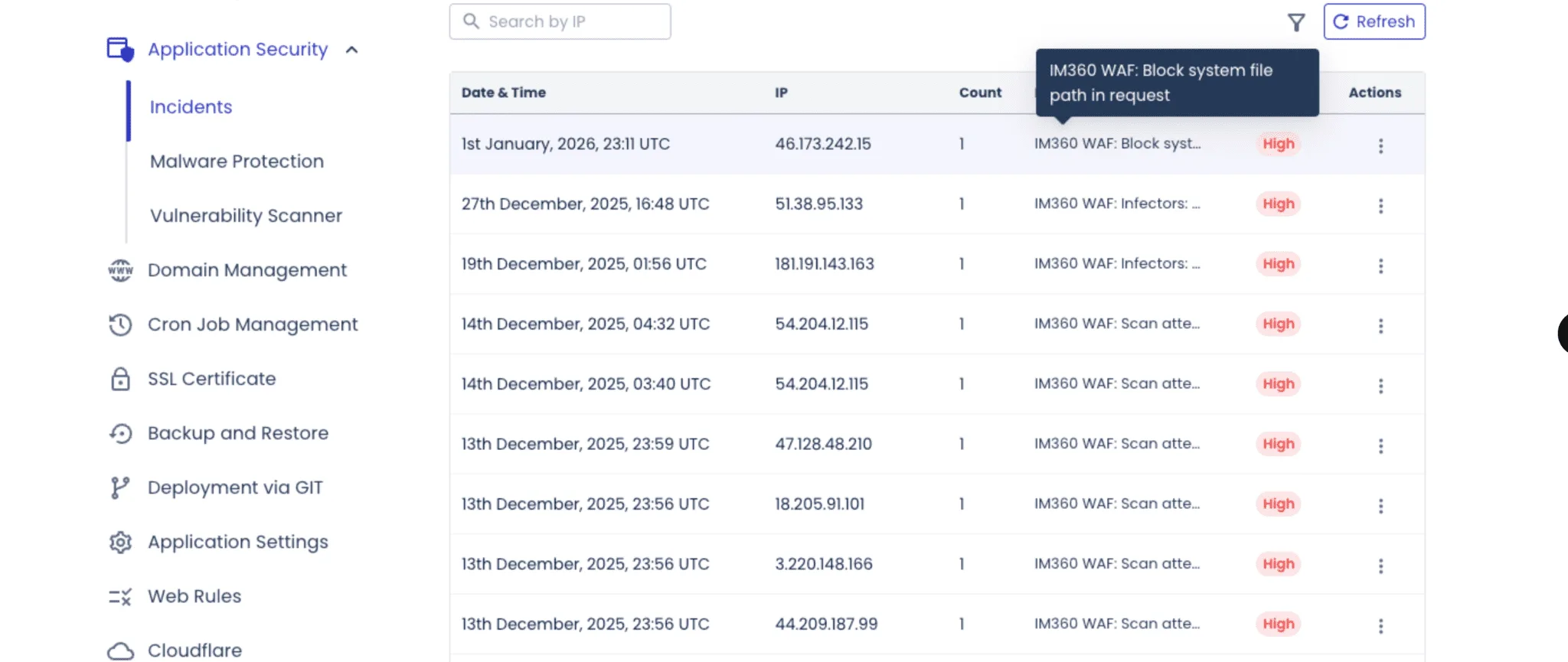
Cloudways WAF was blocking only a single IP every few days — nowhere near the volume of requests hitting the CPU:
The most frequent requests were dynamic PHP endpoints that bypassed cache entirely, causing direct load on PHP and MySQL:
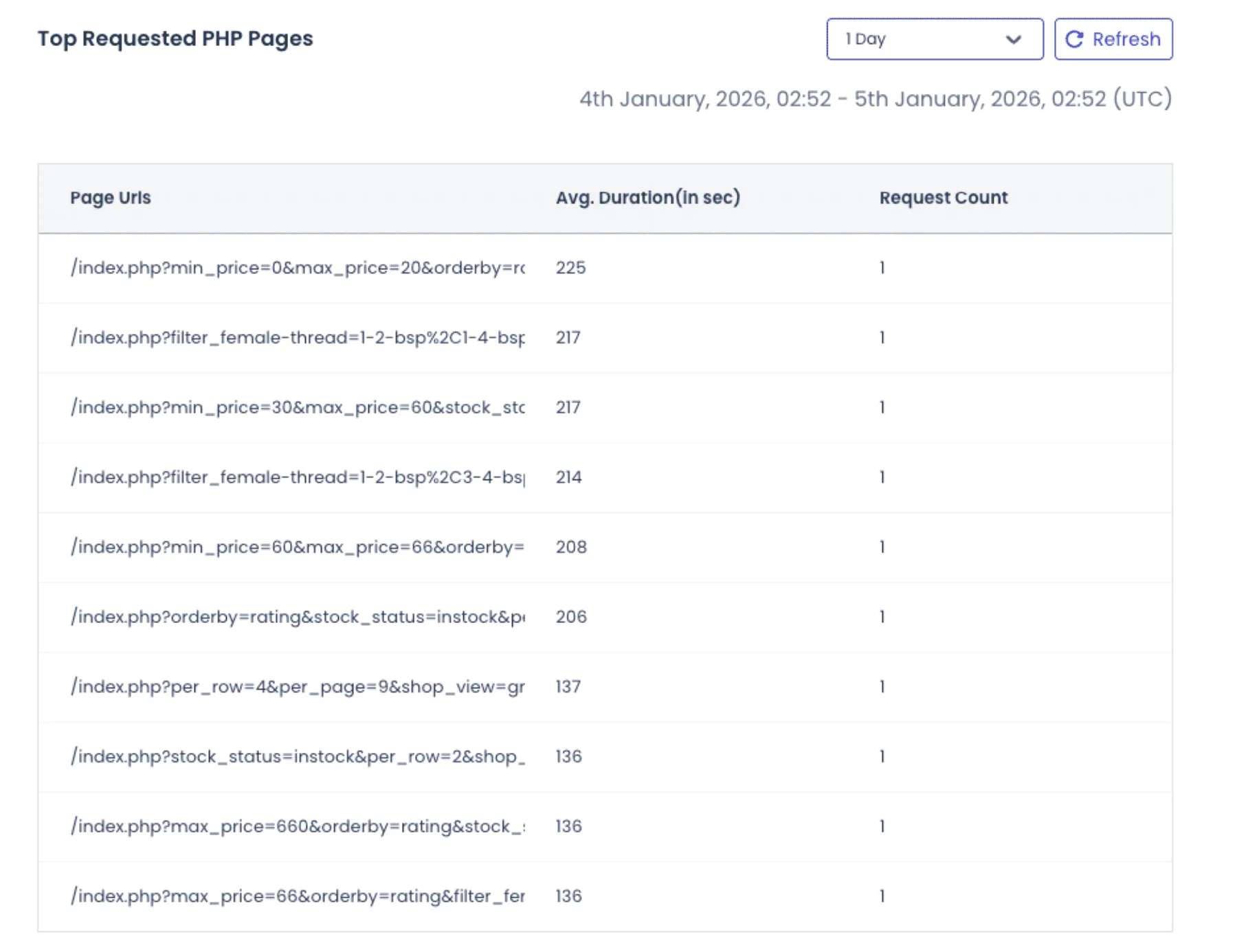
This confirmed the root problem: bots hitting uncached dynamic endpoints, and the hosting and security stack failing to stop them.
Despite the knowledge above, reporting data was minimal and did not provide adequate information to address the root problem inside the Cloudways UI.
Migration to WPStaq
Using the Staq Migrator plugin, Loudcow seamlessly migrated the site to WPStaq.
Then using WPStaq’s GoLive workflow, the site was taken live in minutes — ready to run on Staq’s optimized platform.
- No custom firewall rules were applied.
- No special tuning.
WPStaq was confident its out-of-the-box security stack would make a difference immediately.
Post-Migration Results
Within 24 hours of hosting on WPStaq:
- The Staq Firewall automatically blocked over 2,000 unique IP addresses across a vast amount of countries
- CPU utilization stabilized
- NetSuite syncing continued without interruption
- No “Under Attack Mode” required
- Log analysis was easy to interpret via the UI.
Staq Firewall Transparent Reporting
The Staq Firewall reporting inside the WordPress UI made it simple to understand the root cause of the issue. When reviewing the 2,000+ unique IP addresses that were blocked during the first 24 hours, it became clear that it wasn’t a single IP hammering the site — it was thousands of unique IPs, each making a single request, coming from multiple countries simultaneously.
This instantly validated two critical facts:
-
The traffic that caused Cloudways to fail was in fact hostile bot traffic
-
Cloudways was not stopping it, because it was not hitting traditional rate limits
Cloudways and Cloudflare rely heavily on per-IP rate limiting, which means a bot sending thousands of single-request IPs can bypass rate limits entirely. Modern AI scrapers intentionally do this to avoid detection.
Why WPStaq Stopped Single-Request IPs
So why did WPStaq block these single-request IPs when Cloudways and Cloudflare did not?
Because the 2,000 IPs being blocked by WPStaq were known malicious hosts, reported to CleanTalk (a global anti-spam and bot reputation service). WPStaq subscribes to CleanTalk’s highest-tier API and continuously syncs this threat intelligence into the Staq Firewall. This partially makes up a small component of the Staq Firewall solution. See how does the Staq Firewall system works.
This gives WPStaq visibility into global bot reputation, not just raw request rates.
Despite blocking thousands of attacks automatically, the transparent firewall logs revealed additional opportunities for tuning, which Loudcow easily applied through the UI without needing server access or log parsing tools.
Further Control Using WPStaq Firewall
Reviewing all international traffic appeared to be bots. So it was decided that custom tweaks to the Staq Firewall was needed. The tweak took less than 60 seconds to apply.
Even though WPStaq was already blocking over 2,000 unique IPs/day, Loudcow was able to easily review the Firewall Access Logs directly inside WordPress (no SSH, no server access, no log scraping).
From there, the team enabled country blocking — and because the Staq Firewall has an Exempted Source feature, safe crawlers such as Googlebot, Bing, ChatGPT, Meta, and other verified bots were automatically allowed through.
This ensured:
✔ SEO was not affected
✔ NetSuite syncing was not affected
✔ Legitimate bots were not affected
After applying country rules, on 21 January 2026 alone, the firewall stopped an additional 25,000+ requests in one day.
Outcome
After migrating to WPStaq, Loudcow has not needed to:
- Lodge a single ticket
- “put out fires” or investigate CPU spikes.
- Development continued normally
- integrations remained stable, and
- hosting was no longer a blocker for their client.
Why the previous security stack failed
Before migrating, Loudcow already had multiple security products in place:
- Cloudways WAF (hosting layer)
- Cloudflare (CDN layer)
- Malcare (plugin layer)
- Patchstack (plugin layer)
On paper, that appears to be “secure.”
In reality, the tools were fragmented and not working together across layers.
Don’t get me wrong. They are all respected brands in their right. But a tech stack of security plugins that are all independent cannot work together.
The Root Issue: Wrong Layer of Defense
Malcare and Patchstack operated inside WordPress, which is one of the lowest layers in the server “onion.”
By the time a WordPress security plugin runs:
- The request has passed through the network stack
- PHP has initialized
- WordPress has loaded
- The database connection exists
- CPU and memory are already consumed
At that point, blocking is too late — the damage is already done.
This explains why CPU kept hitting 100% even though “security plugins” were installed.
WPStaq’s Advantage
WPStaq handles abuse at the platform and infrastructure layers, not the plugin layer.
This means malicious traffic is dropped:
- Before PHP
- Before WordPress
- Before the database
This is why performance instantly stabilized without needing extra plugins or firewall tuning.
“Moving to WPStaq removed a huge infrastructure burden. Our client stopped crashing, dev work resumed, and we no longer dread hosting problems.”
— Catie, Loudcow
Resources
See our WordPress Security Whitepaper
See how the Staq Firewall works
Reaching out
If you want to better secure your WordPress environments, feel free to book a call or sign up to WPStaq.
