
Make the Most of Staq’s Features
If you’ve recently received an email showing something like the image below:
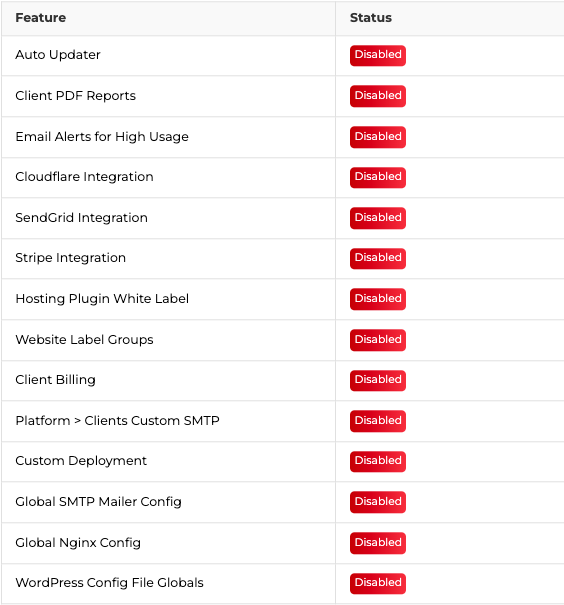
The image in the email that was sent to you gives you a clear overview of the features currently enabled or disabled in your Staq account. It’s a handy way to track what you’re using and explore new features that can make your workflow more efficient.
Below is a table that outlines all the features available in Staq, along with descriptions and links to step-by-step guides in our knowledge base.
| Feature | Description | Knowledge Base Link |
|---|---|---|
| Auto Updater | Automate plugin and theme updates based on when they are available or schedule the updates. You can force updates when a vulnerable plugin or theme is discovered. | KB Article |
| Client PDF Reports | Automated reports that show your clients plugin updates, backups, firewall attack preventions, and more. Version 2 will include GA4, WooCommerce data, and customizable branding. | KB Article |
| Stripe Integration | Automate invoicing and payment collection via Stripe. Set up custom plans for care plan services with white-labeled invoices. | KB Article |
| Client Billing | Automate invoicing, payment collection, and subscription management via Stripe, tailored to your care plan services. | KB Article |
| Platform > Clients Custom SMTP | Use your own SMTP service for Client PDF Reports and invoices for a true white-label experience. Emails appear to come from your custom domain. | KB Article |
| Email Alerts for High Usage | Add additional emails so others are alerted about high usage or potential overages to keep everyone informed. | KB Article |
| Cloudflare Integration | Automate Cloudflare deployment, including firewall and caching rules, enabling proxy with auto-SSL. It also reduces bandwidth usage as traffic routes through their network. | KB Article |
| SendGrid Integration | Automate SMTP deployment with SendGrid through Staq. Automatically insert DNS records and SMTP details into the WP Mail SMTP plugin for seamless email functionality. | KB Article |
| Hosting Plugin White Label | Replace “Staq Hosting” branding inside WordPress with your own name, icon, logo, and brand colors for a fully white-labeled experience. | KB Article |
| Website Label Groups | Organize websites and clients using labels within the Websites table, simplifying project and client management. | KB Article |
| Custom Deployment | Automate deploying environments with specific plugins, premium licenses, and WP CLI commands, streamlining setup for every new project. | KB Article |
| Global SMTP | Automate deployment of your agency’s SMTP settings across all your sites in case an SMTP service hasn’t been provided. Overwrite it using SendGrid integration or a custom service. | KB Article |
| Global SMTP Mailer Config | Configure SMTP settings across all sites to manage outgoing emails easily with a unified mailer configuration. | KB Article |
| Global Nginx Config | Centralized Nginx configuration for optimized performance across all your hosted environments. | KB Article |
| WordPress Config File Globals | Automate setting global configurations in your `wp-config.php` for better control over WordPress settings and security. These configurations apply to all your sites. | KB Article |
By activating these features, you can save time, enhance your branding, and improve your client management—all while delivering a seamless hosting experience. Start exploring and activating them today!
See it for yourself.
Create a WordPress environment in 60 seconds. Migrate your first site free. 400+ agencies already made the switch.
